Running the Workflow
The full NSBI pipeline can be executed step-by-step or orchestrated via HTCondor DAGMan on a cluster. We will soon add Snakemake as an option for workflow orchestration, being agnostic to the computing infrastructure and thus allowing runs on HPC, HTC or even a personal laptop.
Below is an example workflow using the FAIR Universe \(H\to \tau\tau\) dataset.
All pipeline scripts are driven by a single configuration file, config.pipeline.yaml, located at the root of each example directory (e.g. examples/FAIR_universe_Higgs_tautau/config.pipeline.yaml). This file defines dataset paths, training hyperparameters, ensemble sizes, systematic variations, and fit settings. Inspect the example config to understand the available options.
Pipeline overview
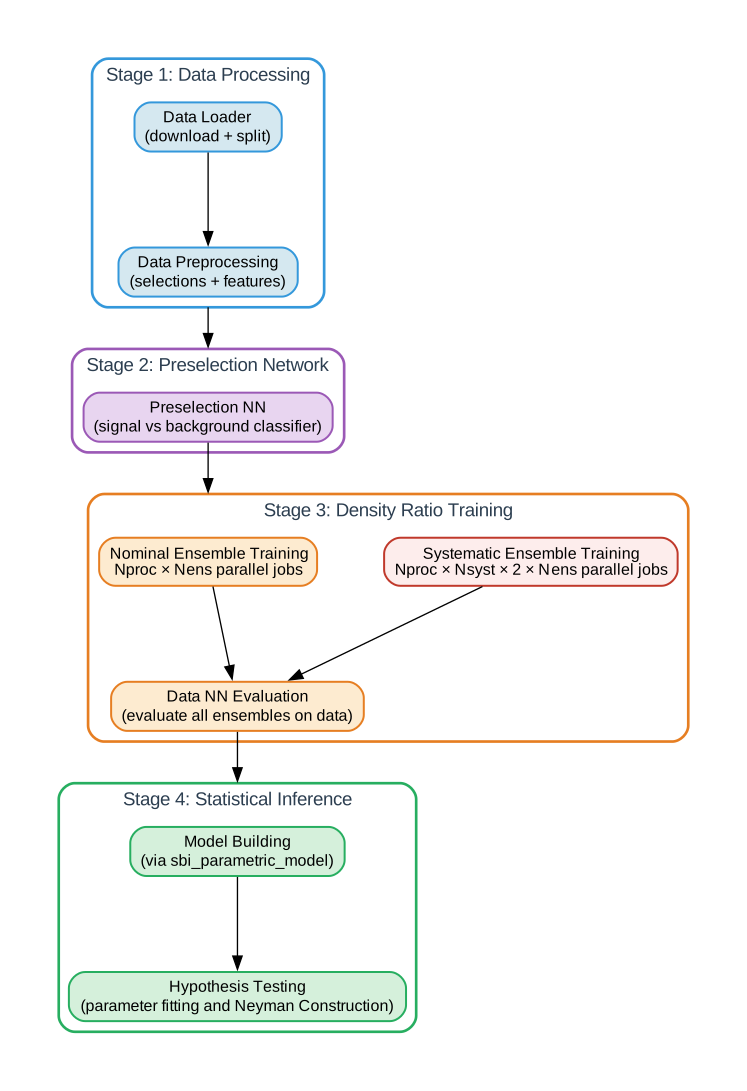
Local (sequential) execution
From the example directory
(examples/FAIR_universe_Higgs_tautau/):
# 1. Load and preprocess data
python scripts/data_loader.py --config config.pipeline.yaml
python scripts/data_preprocessing.py --config config.pipeline.yaml

# 2. Train preselection network (region classifier)
python scripts/preselection_network.py --config config.pipeline.yaml

# 3. Train nominal density-ratio ensembles (per process)
python scripts/neural_likelihood_ratio_estimation.py \
    --config config.pipeline.yaml --process htautau --ensemble_index 0

# 4. Train systematic variation networks
python scripts/systematic_uncertainty_training.py \
    --config config.pipeline.yaml --process htautau --systematic JES --direction Up

# 5. Evaluate all trained models on the Asimov dataset
python scripts/data_nn_eval.py --config config.pipeline.yaml

# 6. Build workspace and fit
python scripts/parameter_fitting.py --config config.pipeline.yaml
Steps 3 and 4 are embarrassingly parallel across processes, ensemble members, and systematic variations.
Cluster execution (HTCondor / DAGMan)
The htcondor/ directory contains submit descriptions and DAG files that orchestrate the pipeline on CHTC, via the configuration file config.pipeline.yaml`:
htcondor/
  workflow_full.dag                  # top-level DAG submitting the full end-to-end workflow
  stage_data_processing.dag          # data loading and processing DAG
  stage_preselection_network.dag     # train signal- and control-region selection neural network
  stage_density_ratio_training.dag   # top-level density ratio estimation and evaluation DAG
      generate_training_dag.py           # generates train_ensemble.dag dynamically
      generate_systematics_dag.py        # generates train_systematics.dag dynamically
      train_ensemble.dag                 # one job per (process, ensemble_index)
      train_systematics.dag              # one job per (process, systematic, direction)
  stage_parameter_fitting.dag        # Build model and fit parameters for statistical inference
Submit the full pipeline:
condor_submit_dag examples/FAIR_universe_Higgs_tautau/htcondor/workflow_full.dag
The full DAG structure, including ensemble parallelism:
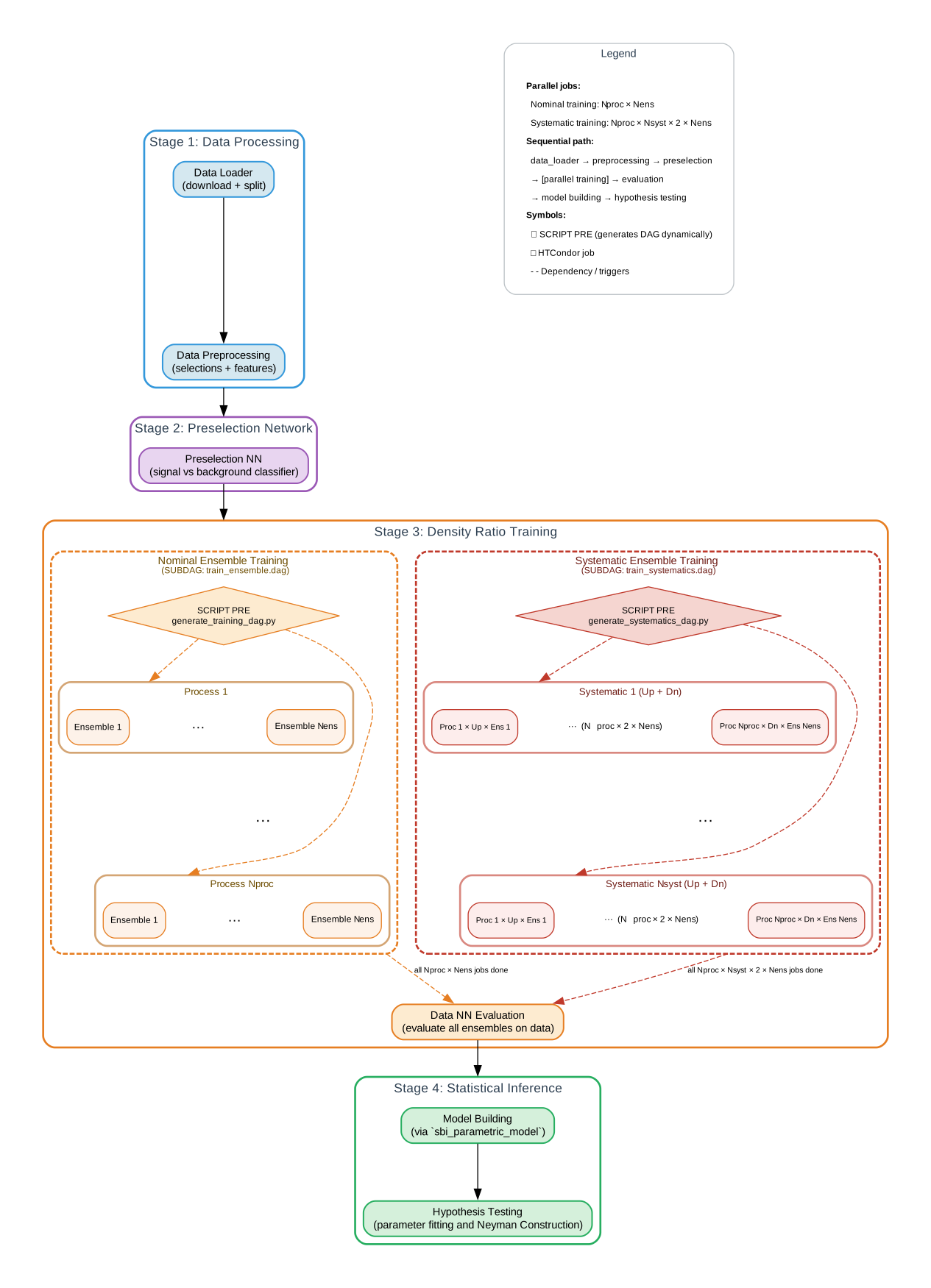
Submit the training and evaluation pipeline (targetted submitting for optimizations):
condor_submit_dag examples/FAIR_universe_Higgs_tautau/htcondor/stage_density_ratio_training.dag
Stage 3 (density ratio training) in detail:
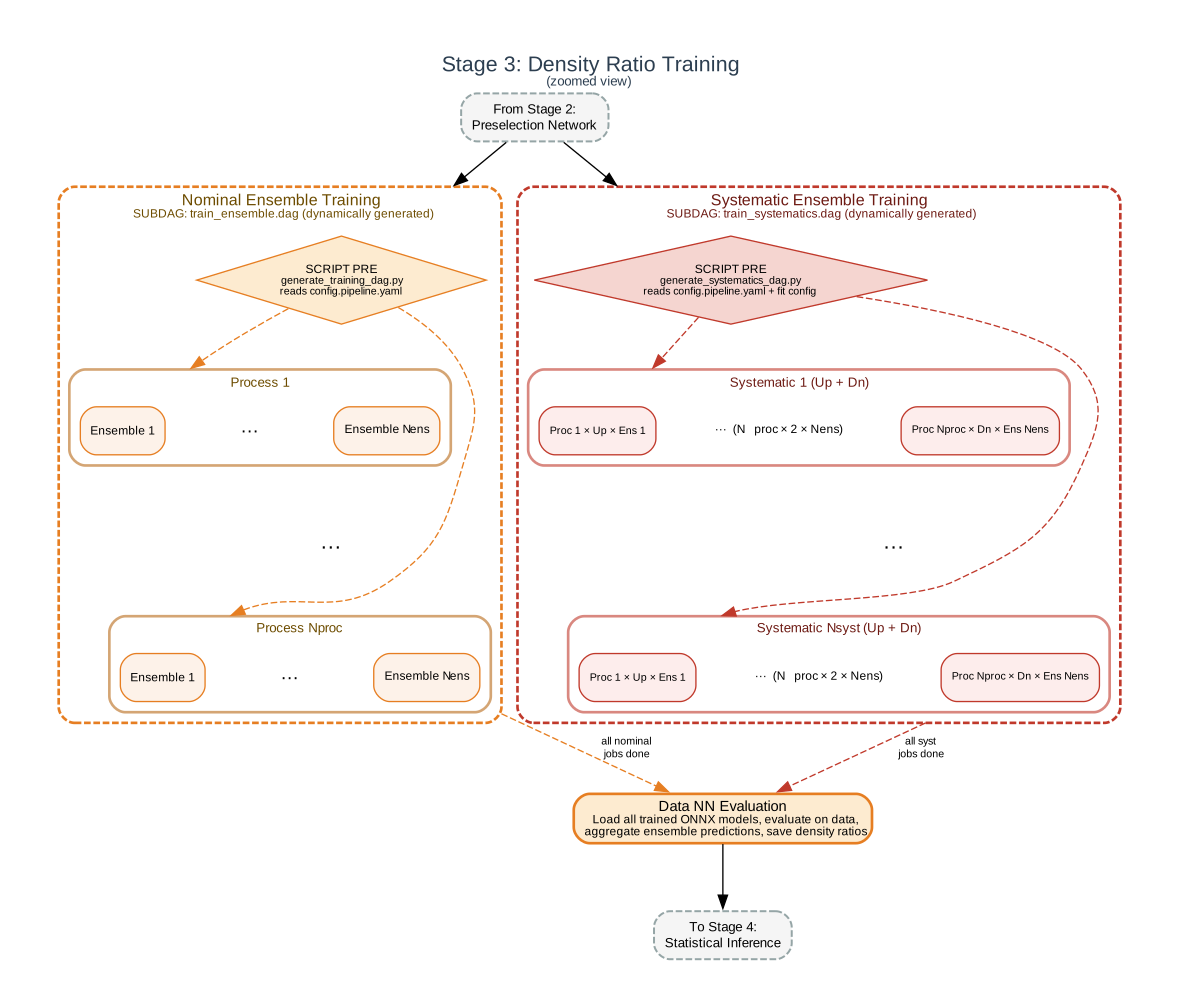
DAGMan handles:
SCRIPT PRE — dynamically generates the training DAGs by reading the pipeline config (number of ensemble members, systematic variations, etc.).
SUBDAG EXTERNAL — submits the generated DAGs as nested sub-workflows.
PARENT/CHILD — ensures evaluation runs only after all training completes.
RETRY — automatically retries failed jobs (transient GPU errors, etc.).
File transfer
Each job transfers the source code and example directory to the execute point via transfer_input_files. Trained model outputs are transferred back per-job to unique directories (keyed by process and ensemble index) to avoid overwrites from concurrent jobs:
transfer_output_files = .../output_model_params_$(PROCESS_TYPE)$(ENSEMBLE_INDEX),
                        .../output_figures_$(PROCESS_TYPE)$(ENSEMBLE_INDEX),
                        .../output
The evaluation job (data_nn_eval) transfers the full saved_datasets/ back since it is a single job with no concurrency risk.
Adapting to your cluster
The HTCondor setup under htcondor/ is written for the CHTC pool at UW-Madison and will not work out of the box on other clusters. To adapt it you will need to modify at minimum:
Submit descriptions (
*.subfiles) — resource requests (request_gpus,request_memory), container image orrequirementsclassad, andtransfer_input_files/transfer_output_filespaths to match your storage layout.``config.pipeline.yaml`` — update all dataset and output paths to reflect your directory structure.
Environment setup — the submit files assume a specific container or software stack; replace with your site’s equivalent (conda/pixi env, Apptainer image, module loads, etc.).
If your site uses a different batch system (SLURM, PBS, etc.) you can still use the local sequential commands above and wrap them in the appropriate job scripts. Snakemake support (infrastructure-agnostic) is planned.